

99 Nights in the Forest: Everything About Flames
Learn how to get and use all 13 Modifier Flames in 99 Nights in the Forest, including effects, sources, and activation steps.


99 Nights in the Forest is a survival Roblox game where you need to upgrade your campsite, explore the map, and collect items to survive and escape from threats lurking in the forest. On February 21, 2026, the game received its Modifier Flames update, which introduced a new system that lets players apply special flames to their campfire to trigger specific events during a run.
Instead of relying on random night events, you can now force certain invasions and scenarios by using different flame types.
In this article, we'll explore everything about the Flames modifier in 99 Nights in the Forest, including how to obtain them, how to use them, and what each flame type does.
Also Read: 99 Nights in the Forest: Everything About the Tool Trader
What Are Modifier Flames
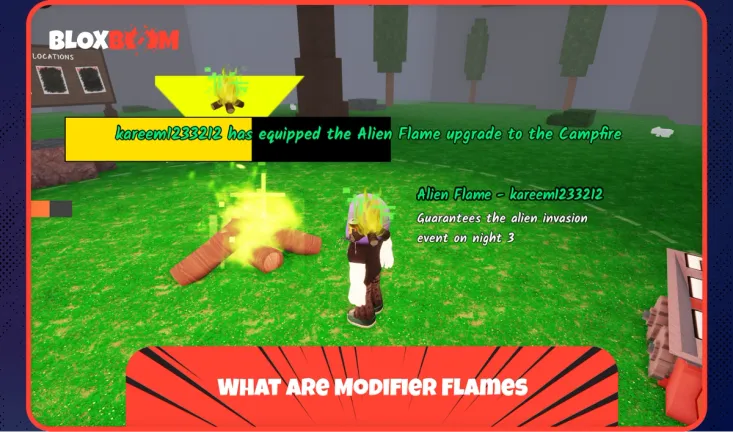
Modifier Flames are items that you apply to your campfire to force specific events during a run. Instead of relying on random night events, you choose exactly what happens, whether that's an Alien Invasion, a Fairy spawn, or a Meteor Shower.
Only one flame can be active per run, and it's consumed once used. However, flames don't expire in your inventory, so you can save them for whenever you're ready. Since the February 21, 2026, update, flames are now activated in-game on Day 1 rather than being locked in from the lobby, which gives you more room to plan around your current setup.
Also Read: 99 Nights in the Forest Classes Tier List
How to Use Flames
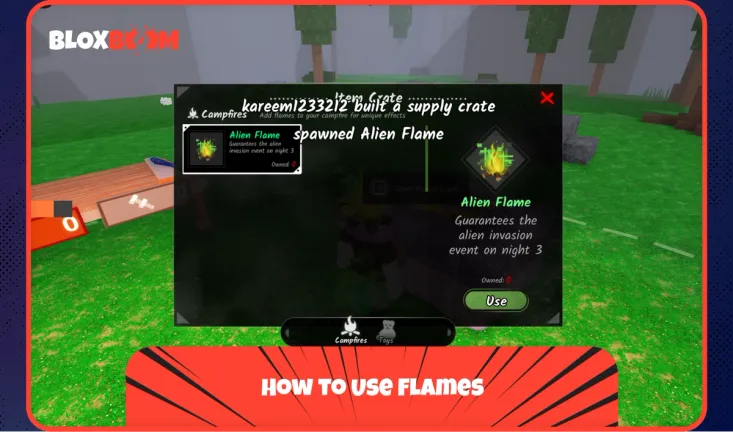
To use a flame during your run, follow these steps:
- Start a run and chop trees to collect 3 wood.
- Head to the Crafting Bench and craft a Supply Crate.
- Place the Supply Crate near your campfire.
- Interact with the crate to open your flame inventory.
- Select and equip the flame you want to use.
- Fully light up your campfire to activate the modifier.
Keep in mind that flames can only be activated on Day 1. If you fully light your campfire and move to Day 2 before placing a flame, you won't be able to use one for that entire run. Always craft and place the Supply Crate before maxing out your campfire.
Also Read: How to Revive in 99 Nights in the Forest
All Modifier Flames
The game currently has 13 Modifier Flames, each tied to a specific event or gameplay effect. Below is a full breakdown of every flame and what it does.
| Flame | Effect |
| Blue Flame | Campfire consumes much less fuel in rain |
| Meteor Flame | Night 3 guaranteed meteor shower event |
| Alien Flame | Night 3 guaranteed alien invasion event |
| Frog Flame | Night 3 guaranteed frog invasion event |
| Halloween Carnival Flame | Carnival spawns Night 1, opens Night 3 |
| Valentine's Flame | Night 3 guaranteed Valentine event (flowers, gifts for strong rewards) |
| Thanksgiving Flame | Night 3 guaranteed Thanksgiving event |
| Coinsplosion Flame | Massively increased Mossy Coins spawn rate across map |
| Fishing Flame | Better fishing spot spawn rate and efficiency |
| Taming Flame | Faster taming flute upgrade (more XP) |
| Red Chest Flame | Much higher Red Chest (rare) spawn rate |
| Apple Tree Flame | Many normal trees become apple trees (huge food source) |
| Fairy Flame | Higher Seed Box spawn rate |
Conclusion
Modifier Flames give you direct control over which events appear during your run, rather than leaving everything to chance. Focus on completing daily quests consistently to build up your flame inventory, and always remember to craft your Supply Crate and place your flame before fully lighting the campfire on Day 1. Pick the right flame based on what you need for that run, whether it's coins, food, rare chests, or a specific event, and you'll make the most out of every match.