

How to Send Robux to a Friend on Roblox


TL;DR
You can send Robux straight to a friend's account with Roblox Plus, which costs $4.99 USD a month. Without Plus, you can use a Roblox gift card, a Request Robux gift link (US only), a game pass your friend creates, or a group payout. Direct transfers are capped at 500 Robux a day and 1,000 Robux a month, and you can't reverse them.
How to Send Robux to a Friend With Roblox Plus
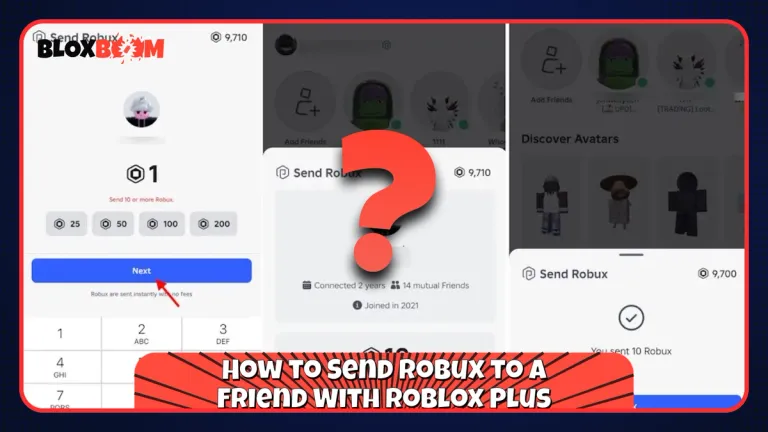
Roblox Plus launched on April 30, 2026, and it includes Robux transfers with no platform fee. Only the sender needs the subscription. Your friend can receive Robux on a free account.
What You Need Before You Send
Both accounts have to meet Roblox's age requirements. If you are 16 or older, you must complete an Age Check. If you are under 16, you need a linked parent account, and your parent has to approve every transfer. Some regions require parent approval for everyone under 18. Your friend has to meet the same requirements to receive Robux.
Steps to Send Robux
Open your friend's profile, or start from the Buy Robux page, and choose the Robux transfer option. Enter the amount and select Continue, check the details, then select Send. Your friend gets a notification and has to select Accept before the Robux land in their balance. The full rules are on Roblox's Sending and Receiving Robux page.
Transfer Limits
Standard accounts can send up to 500 Robux a day and 1,000 Robux a month. If you have 2-Step Verification on and your account is in good standing, the limits rise to 5,000 a day and 10,000 a month. Roblox can change these limits at any time.
The catch is that Robux sent this way can't be cashed out through DevEx, so your friend can only spend them inside Roblox. If your friend rejects the transfer, the Robux go back to you. The same happens if the age requirements aren't completed within 7 days.
Also Read: How to Get a Refund on Roblox
How to Send Robux to a Friend Without Roblox Plus
If you don't want a subscription, you have four options. None of them is a direct transfer, and each one has its own catch.
Send a Roblox Gift Card
Buy an official Roblox gift card, digital or physical, and send your friend the code. They redeem it at roblox.com/redeem on their own account. Most gift cards add Roblox Credit, which your friend then spends on Robux, so check the card type before you buy.
Use a Request Robux Gift Link
Your friend goes to the Buy Robux page on desktop or web, selects Request Robux, and copies the link or QR code. They send it to you, and you open it in a browser, check the username and avatar, pick a Robux package, add a message, verify your phone number, and pay.
The catch is availability. Roblox lists this feature for select users in the US only, on a computer or web, and both of you must be 18 or older. Purchases are final, prepaid cards don't work, and the packages come at standard pricing with no bonus Robux or bonus items. Roblox explains it all on the Gifting Robux page.
Buy a Game Pass From Your Friend
This only works if your friend has a published experience. They create a game pass priced in Robux and send you the link, then you buy it. Roblox keeps 30%, so your friend receives 70%. To get 700 Robux to your friend, the pass has to cost 1,000 Robux.
Send a Group Payout
If you and your friend share a group, the owner or a member with revenue permissions can send a one-time payout from the Payouts page under Finances. Roblox asks for a 2FA check, and the page can stay locked on newer groups or groups without enough funds. Creating a group costs 100 Robux, so this only makes sense when the group already exists.
Also Read: Roblox Guides on the BloxBoom Blog
How to Send Robux Safely
Transfers can't be canceled or reversed, so check the username twice before you send. Roblox will never ask you to send Robux to verify an account, so treat anyone who does as a scammer. Never share your password to "receive" Robux, and skip every free Robux generator. Roblox also tells you to only send Robux to people you know personally.
Conclusion
If you already pay for Roblox Plus, a direct transfer is the fastest way to send Robux to a friend. If you don't, a gift card is the simplest choice, since your friend redeems it on their own account and nobody shares a password. Check the username and the limits first, and never send Robux to someone you don't know.